Manage in one placepurchasing and inventory
Manage purchasing and inventory together in one place, from purchase orders and receiving to stock movements and replenishment.

 Purchase Recommendation
Recommended Purchase: 150 Items
 Low Stock Alert
SKU-1002 Remaining 12 Items
When replenishing stock, do you know your actual inventory?

Purchasing and stock intake are disconnected
Purchase orders and actual arrivals are recorded separately, so checking deliveries and reconciling records requires repeated searching and switching.

Multichannel inventory is hard to maintain
The same item sells across platforms and stores. Unclear stock deductions lead to inaccurate inventory and overselling.

Inventory changes are hard to trace
A current stock count alone does not show changes caused by purchasing, order dispatch, or transfers.

Replenishment still relies on guesswork
Sales, stock, and incoming inventory are viewed separately, leaving replenishment amounts and timing to guesswork.
Manage all product inventory from purchasing to replenishment in one workspace
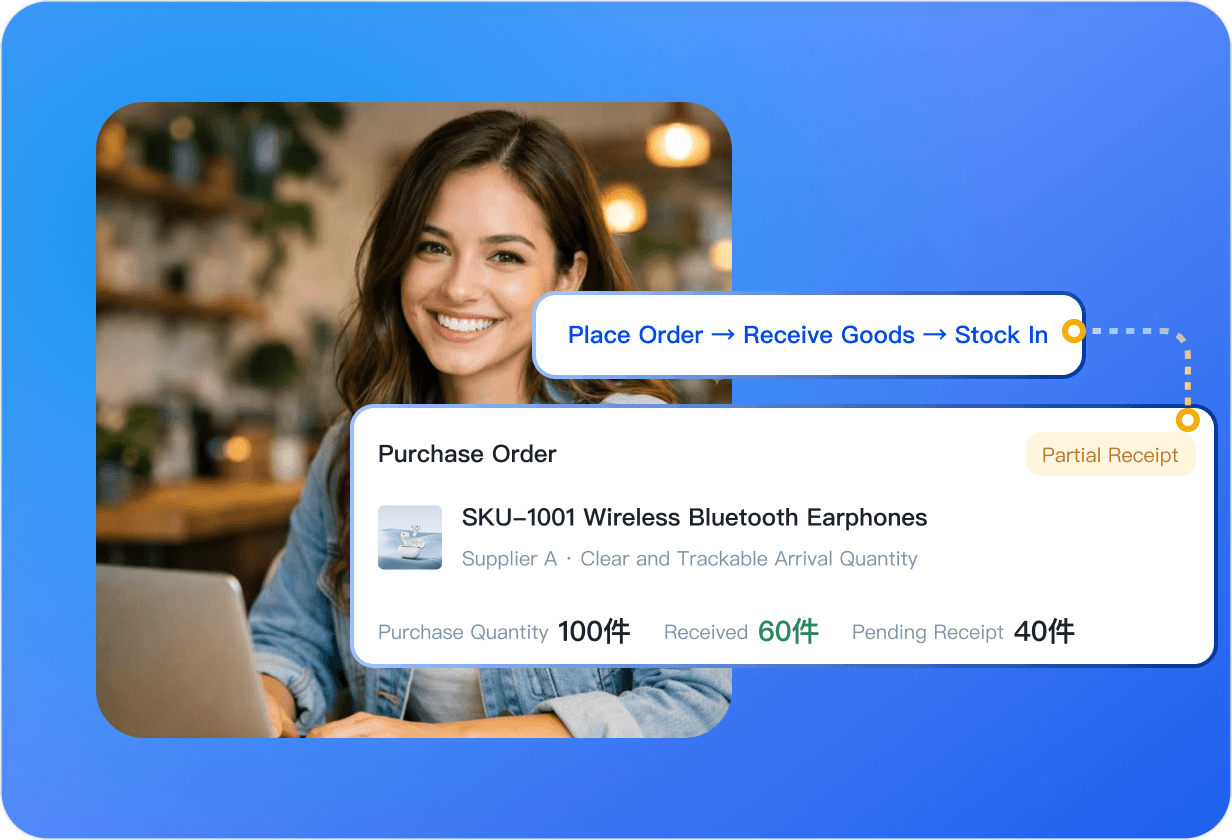
Track the entire purchasing process from order to stock intake
Create purchase orders and track deliveries. Inventory increases automatically after receipt, reducing manual checks across records.
 Create purchase orders:Record purchase information and see status changes—In Transit, Partially Received, and Completed—at a glance.
- Receive goods into stock:Receive all or part of an order. On confirmation, the system adds stock and records the movement automatically.
- Supplier management:Maintain supplier relationships and preset rules such as minimum order quantities, which carry over to purchase orders to reduce mistakes.
- Track arrivals:See quantities in transit, received, and outstanding, and reconcile purchasing with warehouse records in one view.
- Keep purchase records:Retain complete purchase and receipt details for delivery reconciliation and cost tracking.
Make replenishment decisions based on sales, inventory, and purchase records instead of guesswork.
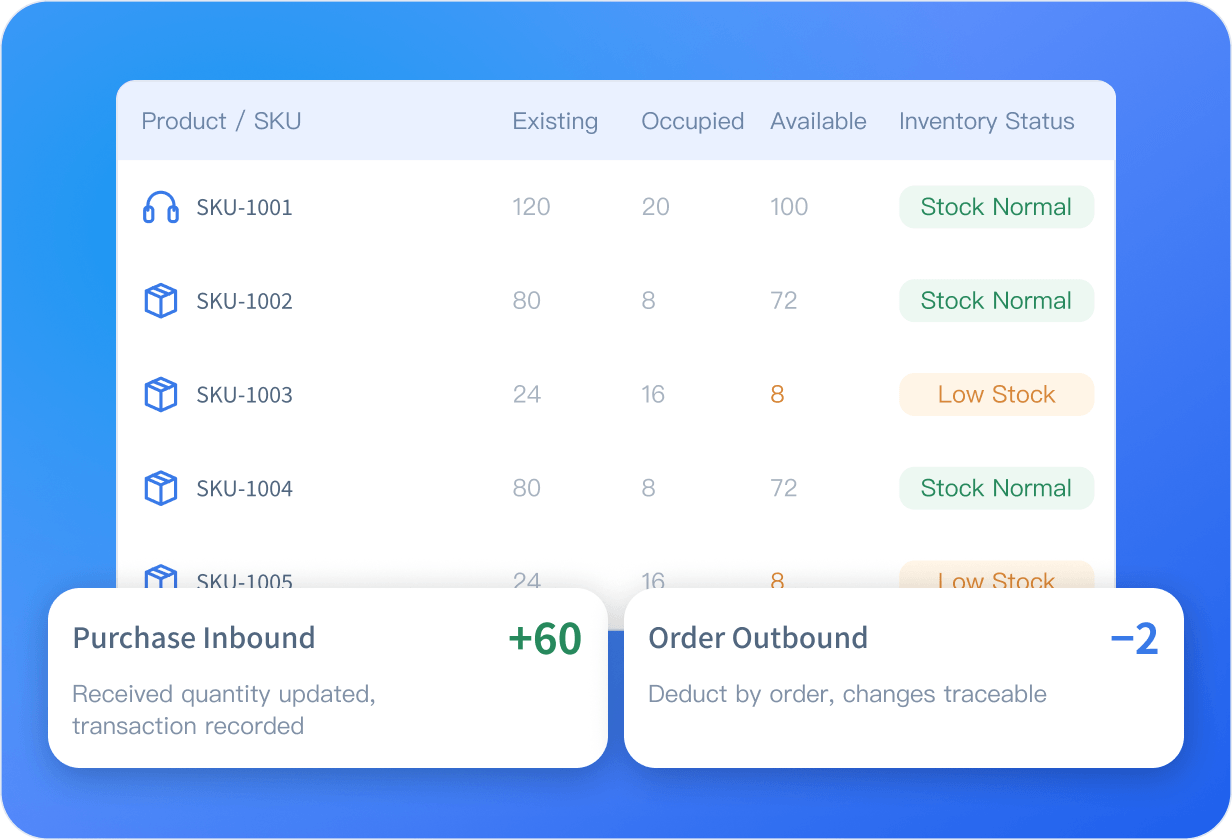
Link products and record inventory changes automatically
Establish matching relationships between warehouse products and online products, automatically sync inventory across multiple channels, keep inventory changes traceable, and help prevent overselling.
- Store management:Set up multiple warehouses and a default warehouse. Keep stock ownership clear across batches for stock counts and transfers.
- Create and match products:Create products in four ways. Once matched, the system reserves and deducts inventory according to orders.
- Sync inventory across channels:Synchronize stock across platforms. A sale on one channel reduces shared stock across all channels to prevent overselling.
- Inventory list:Distinguish available stock from on-hand stock to prevent duplicate sales, with red alerts for low inventory.
- Inventory movement log:Categorize purchases, dispatches, transfers, and other movements so every stock change has a record.
- Trace inventory changes:Pair stock quantities with movement logs to see both the result and the process, and quickly locate reconciliation issues.
Go beyond current inventory levels and trace every inventory change.
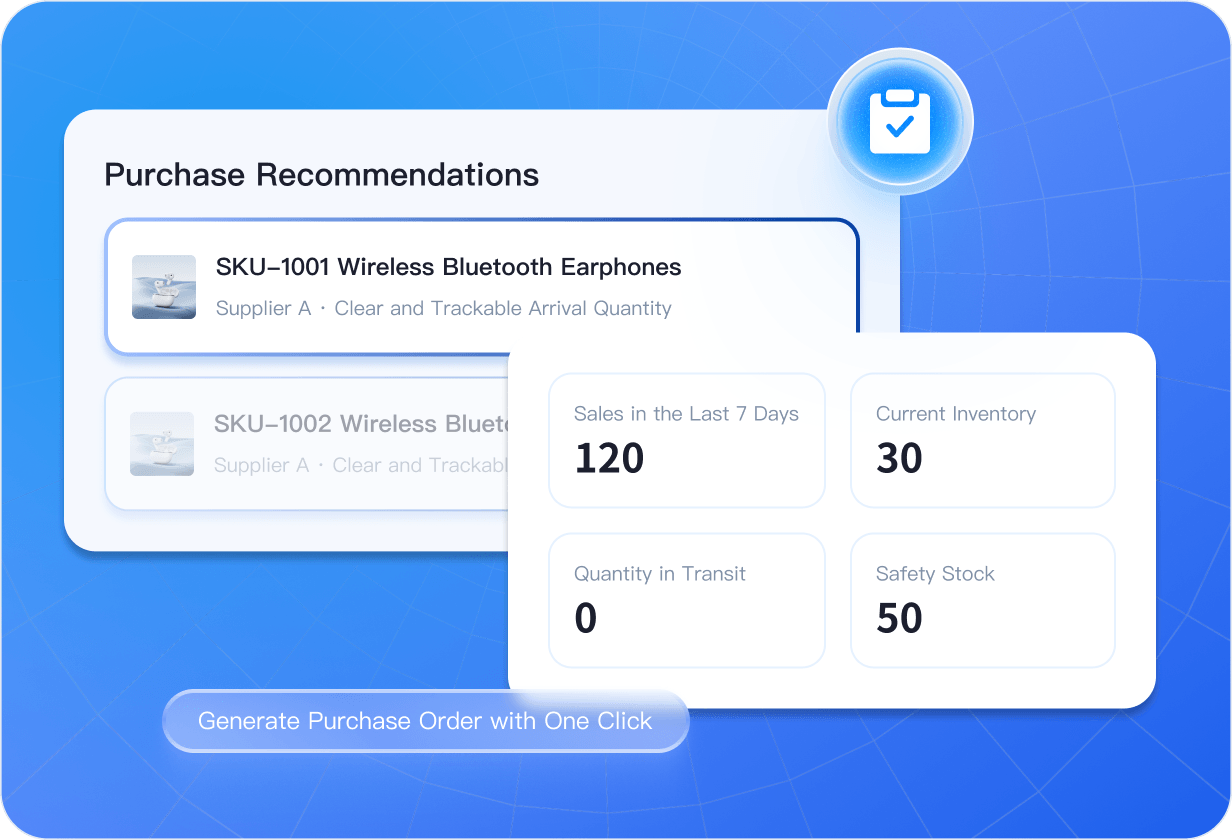
Recommend purchase quantities based on sales and inventory
The system calculates recommended purchase quantities automatically. Know how much to replenish and when, with less manual calculation and guesswork.
- Purchase recommendations:Generate recommended quantities from historical sales, current stock, incoming stock, and replenishment strategies.
- Calculation process:Sales analysis → inventory check → replenishment calculation → rule validation → recommendation.
- Create a purchase order in one click:Calculate using sales over the past 7 or 30 days, available stock, incoming quantities, and safety stock.
- Configurable replenishment strategies:Set item-specific rules such as safety stock and replenishment cycles.
- Connect purchasing with inventory:Use incoming and on-hand stock to generate recommendations, then update inventory on receipt to complete the recommendation → purchasing → stock intake → inventory → next recommendation cycle.
The system helps you calculate how much to replenish and when.
Why use UpSeller to manage purchasing and inventory?
Connect purchase execution, product matching, inventory tracking, and replenishment decisions.

Connect purchasing and stock intake end to end
Purchase orders record arrivals, and stock increases automatically after receipt without manual updates.

Keep warehouse and online products clearly matched
Match warehouse items with online products so orders find the physical items and deduct stock according to settings.

Trace inventory changes end to end
See current quantities in the inventory list and movement records in the log, with discrepancies traced to operation types.

Use purchase recommendations to guide replenishment
Calculate recommended quantities from sales, stock, incoming inventory, and rules to reduce guesswork in ordering.
Frequently Asked Questions (FAQ)
About purchasing, inventory, product matching, and purchase recommendations.
Create warehouse products and set up a warehouse, then match those items with online products and enable stock deductions. When orders come in, the system reserves and deducts stock automatically. You can view inventory data and movement records in the inventory list and movement log.



 Mercado Libre
 Shopee
 Amazon
 SHEIN
 TikTok Shop
 TEMU
 Falabella
 AliExpress
 Magalu
 Kwai
 Americanas
 Walmart
 Shopify
 Nuvemshop
 WooCommerce